
PX Recorder Pro 4K Recording & Live Studio
Hardware-Accelerated 4K Screen Recording, Live RTMP Streaming & Studio Video Production Suite
Product Overview & Architecture
DirectX 11 Studio EnginePX Recorder Pro (PX Studio) is an enterprise-grade Windows desktop screen recording, live broadcasting, and video production suite engineered for content creators, educators, software developers, and broadcasting professionals. Powered by a native DirectX 11 DXGI desktop duplication pipeline and deep hardware acceleration (NVIDIA NVENC, Intel QuickSync, AMD AMF), it captures crystal-clear 4K resolution at 60/120 FPS with near-zero CPU overhead. Features 5 capture selection modes (Full Screen, No Taskbar, Window Lock, Custom Region, Fixed Aspect Ratios), a Studio Audio Bus with WASAPI system loopback and real-time AI noise suppression, a Mouse FX engine with 18 visual effects and acoustic feedback, a Smart Auto-Zoom camera engine with 10 cinematic motion curves, integrated Whisper AI multi-language and Bengali speech-to-text subtitling, DirectShow virtual camera and microphone drivers for Zoom/Teams/Meet/OBS, and an integrated non-destructive timeline video editor with HSL color grading and 3D LUT presets.
Standard screen recorders and streaming software often suffer from heavy CPU consumption, frame drops during high-intensity 3D gameplay or creative workloads, and cluttered recordings with distracting taskbars and system notifications. PX Recorder Pro (PX Studio) is a ground-up engineered Windows multimedia studio that bridges high-performance DirectX 11 DXGI GPU capture with professional broadcast studio controls, Mouse FX, and an integrated non-destructive timeline video editor.
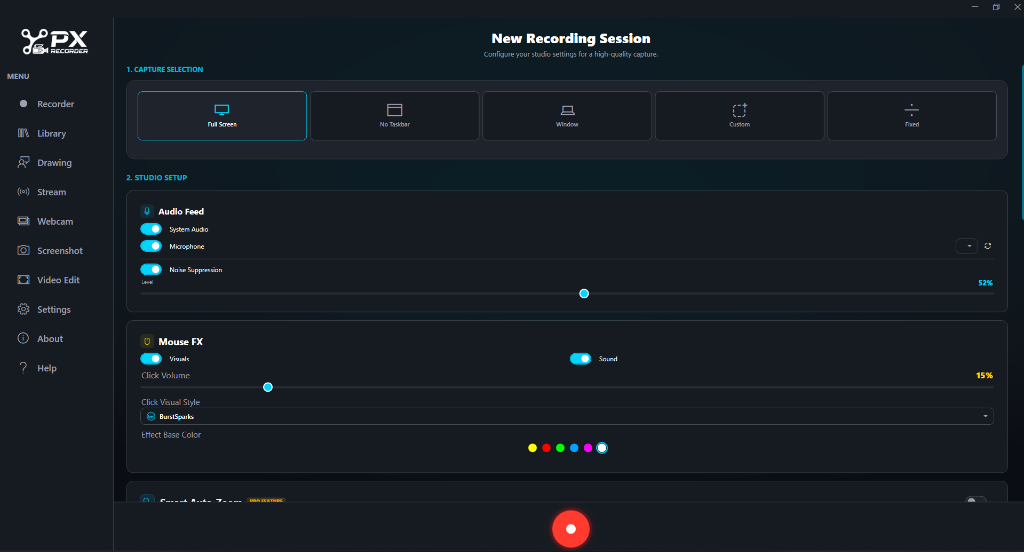
From the studio dashboard, users can immediately configure their workflow across 5 specialized Capture Modes: Full Screen for multi-monitor displays, No Taskbar (an intelligent capture algorithm that crops out the Windows taskbar and system tray for clean, distraction-free tutorial videos), Window Lock (locking onto specific software windows even when minimized or dragged), Custom Rectangular Area, and Fixed Aspect Ratios (such as 16:9 4K UHD, 9:16 vertical reels for TikTok & YouTube Shorts, and 1:1 square).
Core Engineering Capabilities
Hardware-Accelerated 4K DXGI Engine
Direct-to-GPU frame acquisition capturing up to 4K resolution at 60/120 FPS without dropped frames. Native hardware offloading (NVIDIA NVENC, Intel QuickSync, AMD AMF) preserves over 97% of your CPU capacity for heavy workloads and high-end 3D applications.
5 Capture Modes with Distraction-Free "No-Taskbar" Mode
Switch instantly between Full Screen, No Taskbar (automatically crops Windows taskbar and system tray clock for clean tutorials), Window Lock (locks onto active apps even if moved or covered), and Custom Drag Region.
Studio Audio Bus & AI Noise Gate
Capture pristine WASAPI desktop audio loopback and low-latency microphone feeds on isolated tracks. Built-in real-time AI noise suppression slider (0-100%) filters out keyboard clatter, fan buzz, and ambient room noise on the fly.
Mouse FX Engine & 10-Physics Smart Auto-Zoom
18 customizable cursor click animation styles (BurstSparks, RippleRing, NeonPulse, SonicWave), acoustic click sounds with volume control, and 10 cinematic auto-zoom motion physics algorithms (SmoothSpring, CinematicGlide, PunchInSnap) that smoothly track mouse interactions.
What's New & Release Notes
Official update changelog • Version 1.0PX Recorder Pro is a lightweight, high-performance screen recording and audio capture utility built natively for Windows. Engineered for content creators, software educators, and enterprise workflows, it delivers ultra-low CPU overhead, clean audio routing, and crystal-clear video outputs.
🚀 Key Features
- High-Definition Screen Capture:
- Full screen, designated custom region, and active application window capture modes.
- Ultra-smooth recording supporting up to 60 FPS at 1080p, 2K, and 4K resolutions.
- Zero-latency cursor tracking with customizable click highlights and visual tap feedback.
- Dual-Channel Audio Engine:
- Native Windows Core Audio & loopback integration to isolate internal desktop audio.
- Independent external microphone capture with real-time level meters and input gain control.
- Option to merge system sound and mic input into a single track or output discrete multi-channel streams.
- Webcam & Overlay Integration:
- Picture-in-Picture (PiP) webcam feed with customizable positioning, sizing, and corner snapping.
- Real-time preview support without disrupting active capture performance.
- Performance & Hardware Acceleration:
- Hardware-accelerated GPU encoding (NVENC / QuickSync / AMD AMF) for minimal system resource footprint.
- Direct rendering to MP4 and MKV containers with crash-resilient write buffering.
- Productivity Hotkeys & Automation:
- Global hotkeys for Start, Pause, Resume, and Stop actions across all Windows environments.
- Configurable auto-naming schemas and designated instant-export directories.
🛠️ Improvements & Stability
- System Resource Footprint: Optimized background idle state to consume less than 1% CPU and minimal RAM overhead.
- Corrupt File Protection: MKV-backed fail-safe recording prevents unfinalized video loss in the event of abrupt power cuts or unexpected process termination.
- Modern Windows UI: Clean, high-contrast user interface tailored for Windows 10 and Windows 11 desktop environments.
4-Step Installation & Setup Guide
Fast ~30s SetupDownload & Self-Contained Setup
Download the Windows (.EXE) setup package (243.16 MB). Run the clean installer with bundled .NET 8 WPF engine and virtual DirectShow drivers.
Select Capture Mode
Choose Full Screen, No Taskbar (distraction-free desktop), specific Window Lock, or Custom rectangular region with aspect ratio presets.
Configure Audio, Mouse FX & Zoom
Adjust system loopback, enable mic noise suppression (0-100%), select Mouse FX style (BurstSparks) with acoustic clicks, and toggle Smart Auto-Zoom.
Record, Annotate & Timeline Edit
Start recording via hotkeys (F9) or floating toolbar, annotate live with ink & spotlight, and edit in the multi-track timeline before 4K export.
Frequently Asked Questions
Click any question to view answerTechnical Specs
Verified package details
Ibrahim Khalilullah
Founder & Principal Software ArchitectEngineered by Plan Explorer for content creators, educators, and professionals needing broadcast-grade 4K desktop recording and live streaming on Windows.